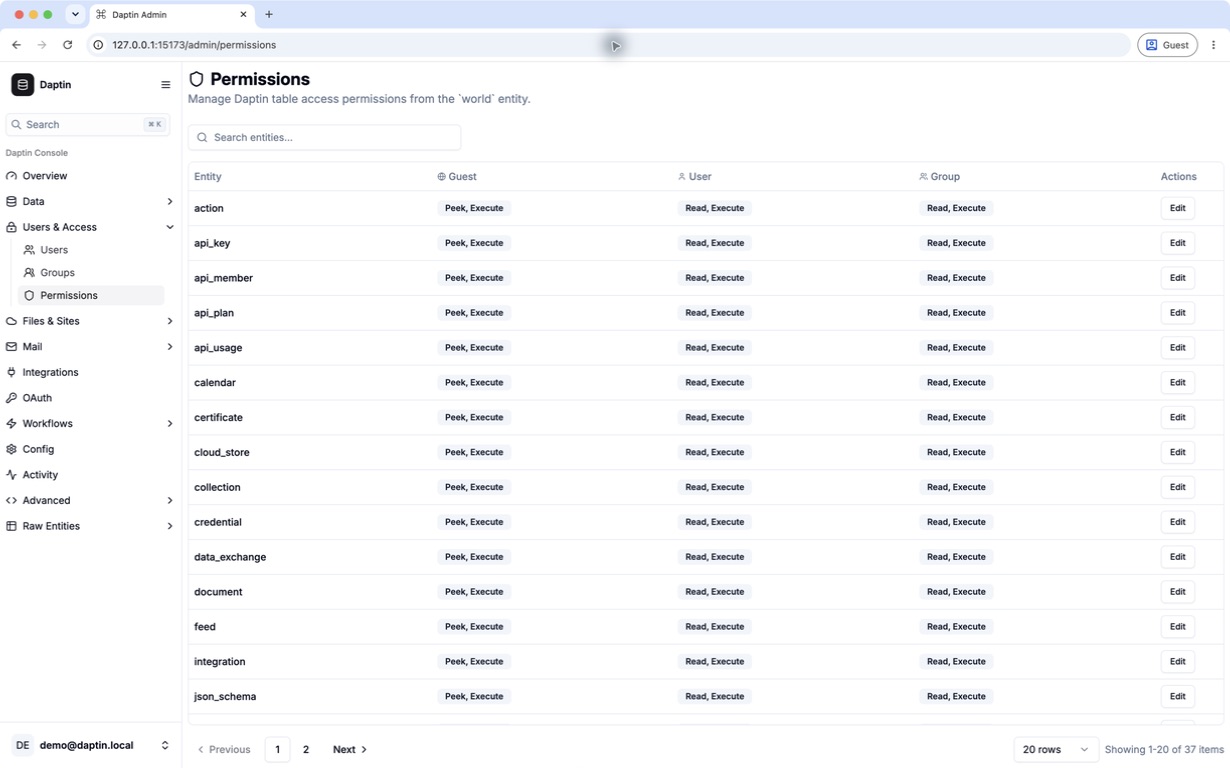
Control each operation
Reading a record, changing it, deleting it, executing an action, and linking it can carry different permission bits.
 Daptin
Run Daptin →
Daptin
Run Daptin →
Permissions and tenancy
Decide who can read, create, update, delete, execute, or refer to data. Apply those decisions to tables, individual records, relationships, and actions.
One access model
Daptin evaluates operation-specific permissions for guests, authenticated users, owners, and groups. That gives a product room for public content, private records, team spaces, and administrator-only operations without scattering checks across handlers.
Reading a record, changing it, deleting it, executing an action, and linking it can carry different permission bits.
Use table defaults, then assign record-level ownership or group access for the cases that differ.
Ownership, groups, and checked relationships support common multi-user product structures.
Permission-cache invalidation prevents old decisions from living indefinitely after access is changed.
Product access patterns
Let guests discover and read published records while only operators create, change, or remove them.
Open the table to signed-in users while owner bits keep each person's rows inaccessible to unrelated accounts.
Use group membership for team records and Refer permission to stop users linking objects they cannot legitimately use.
Allow people to read an object without automatically granting execution of every backend action attached to it.
The important distinction
A group may need permission to reach a resource type while individual rows remain owner-only. Daptin keeps the table gate, record permission, relationship permission, and action permission distinct so opening one layer does not silently open the others.
Changing a default affects newly created records; existing rows retain their stored permission until migrated. Test the matrix with ordinary users, not only an administrator.
Open the permission test guide →Product evidence
The dashboard makes the configured permission surface visible, but configuration alone is not proof. Test every relevant operation as guest, owner, group member, unrelated user, and administrator, and preserve expected denials as regression tests.
Configure and test access →